How to make a plywood cut list, step by step
October 31, 2026 · 9 min read
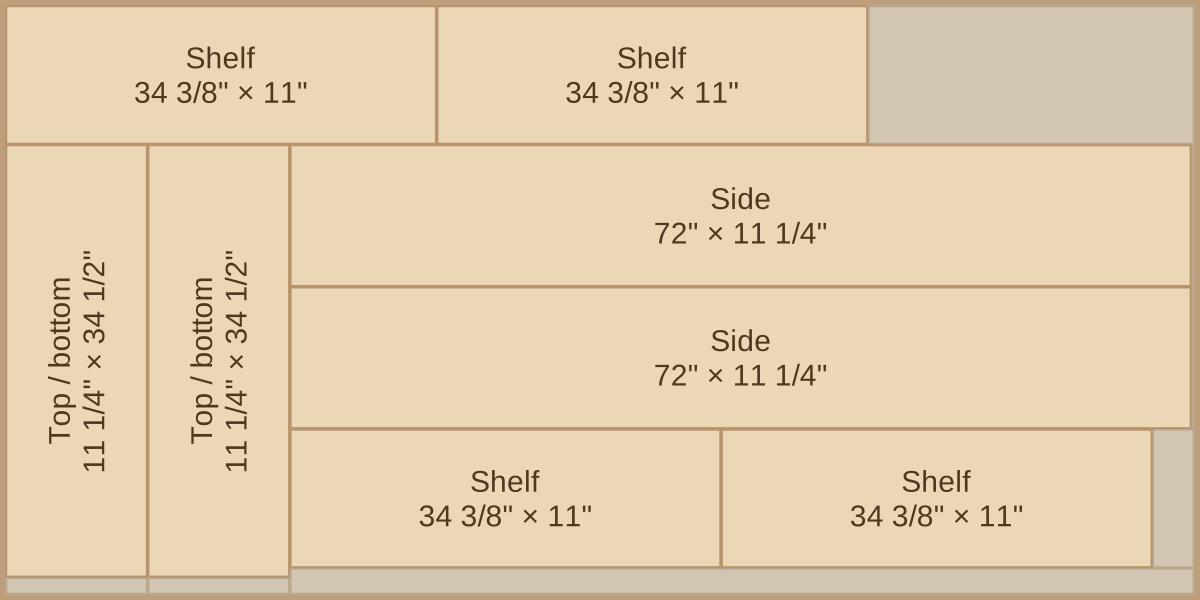
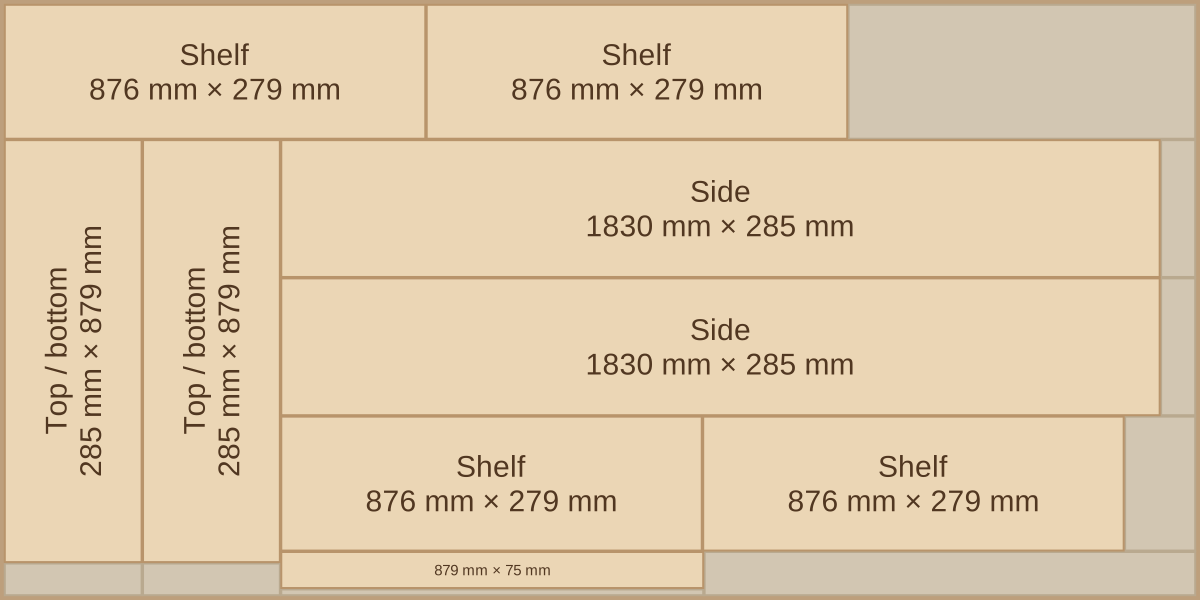
A cut list is the bridge between a drawing and a stack of parts. Get it right and the sawing is routine. Get it wrong and you find out with a shelf that is 3/4"18 mm too long and a sheet that is already in pieces.
This guide builds a complete list for a real project: a bookcase 72" tall, 36" wide and 11 1/4" deep, in 3/4" plywood with a 1/4" back1830 mm tall, 915 mm wide and 285 mm deep, in 18 mm plywood with a 6 mm back.
1. Start from outside sizes
Write down the overall width, height and depth you need, and decide how the panels meet. That decision sets every size that follows. Here the sides run full height and the top and bottom sit between them.
Do this on paper for the corner joints first. Whether the top sits over the sides or between them changes the length of the top and the length of the sides by a full material thickness.
2. Turn panels into parts
Go through the piece one panel at a time and derive each size from the outside dimensions:
- Sides: the full height, 72"1830 mm, and the full depth, 11 1/4"285 mm.
- Top, bottom, fixed shelf: the width less two side thicknesses. 36" − 2 × 3/4" = 34 1/2"915 mm − 2 × 18 mm = 879 mm.
- Adjustable shelves: the same, less 1/16"1.5 mm of clearance at each end so they can move: 34 3/8"876 mm. They are also 1/4"6 mm shallower, so they clear the back.
- Back: let 3/8"9 mm into rabbets at each edge. Overall size less that amount twice: 35 1/4" × 71 1/4"897 × 1812 mm.
The result, with one row per distinct size:
| # | Part | Qty | Length | Width | Grain |
|---|---|---|---|---|---|
| 1 | Side | 2 | 72" | 11 1/4" | along length |
| 2 | Top / bottom | 2 | 34 1/2" | 11 1/4" | free |
| 3 | Fixed shelf | 1 | 34 1/2" | 11 1/4" | free |
| 4 | Shelf | 4 | 34 3/8" | 11" | along length |
| 5 | Toe kick | 1 | 34 1/2" | 3" | free |
| 6 | Back | 1 | 71 1/4" | 35 1/4" | free |
| # | Part | Qty | Length | Width | Grain |
|---|---|---|---|---|---|
| 1 | Side | 2 | 1830 mm | 285 mm | along length |
| 2 | Top / bottom | 2 | 879 mm | 285 mm | free |
| 3 | Fixed shelf | 1 | 879 mm | 285 mm | free |
| 4 | Shelf | 4 | 876 mm | 279 mm | along length |
| 5 | Toe kick | 1 | 879 mm | 75 mm | free |
| 6 | Back | 1 | 1812 mm | 897 mm | free |
3. Measure the real thickness
Plywood sold as 3/4" is often closer to 23/32". Over two sides, that is a 1/16" difference, which is the entire clearance on an adjustable shelf.A sheet sold as 18 mm is not always exactly 18 mm. A few tenths per side use up the clearance on an adjustable shelf. Measure the actual sheet with calipers before you finalize anything that depends on thickness:
36" − 2 × 23/32" = 34 9/16" (not 34 1/2")915 mm − 2 × 18.5 mm = 878 mm (not 879 mm)
If the sheets are not yet bought, leave the parts that depend on thickness until they are. Cutting those last, after a dry fit of the sides, is the cautious way to work.
4. Group by material and grain
A cut list is really several lists, one per material and thickness. The back above is 1/4"6 mm and does not share a sheet with the carcass. Then mark which parts have to follow the grain.
On this bookcase the sides and the adjustable shelves are locked along the length: the sides because they are the tall visible faces, the shelves because a shelf is stiffer with the face grain along its span. The top, bottom and toe kick stay free, which gives the layout more options. More on when grain matters.
5. Set kerf and trim
Two allowances are invisible on the drawing but use real material:
- Kerf is the width of the saw cut. This plan allows 1/8"3 mm per cut. How to measure yours.
- Edge trim is what you cut off each edge of the sheet to get rid of damaged factory edges and start from a clean reference. This plan uses 1/2"10 mm per side, leaving 95" × 47"2480 × 1230 mm.
6. Lay it out on sheets
Now pack the parts onto sheets. Place the longest parts first, because they have the fewest options. Then fill the gaps. You can do this on graph paper, with cardboard cutouts or with a calculator.
The parts of this carcass add up to 0.950.91 sheets of area, yet they take 2 sheets. Two 72"1830 mm sides take up most of a sheet's length, and the 34 1/2"879 mm parts do not all fit in what is left, so the rest spill onto a second sheet.
7. Check before you cut
- Count against the drawing. Quantity errors are the most common mistake. This bookcase has 11 parts, counting the back.
- Add the parts in one direction. The inside widths plus the side thicknesses have to equal the overall width.
- Check the longest part against the usable sheet, not the nominal one. It has to fit after the trim.
- Label each part as it comes off the saw, on an edge or on tape. Offcuts and shelves look alike an hour later.
From here, the last piece of planning is the order of the cuts.
Every layout and sheet count in this guide was calculated by the optimizer inside Plyplan.